
Claude, ChatGPT, Gemini, Copilot, Midjourney. What each one does best, what it costs, and when to use which. Based on daily hands-on use, not press releases.
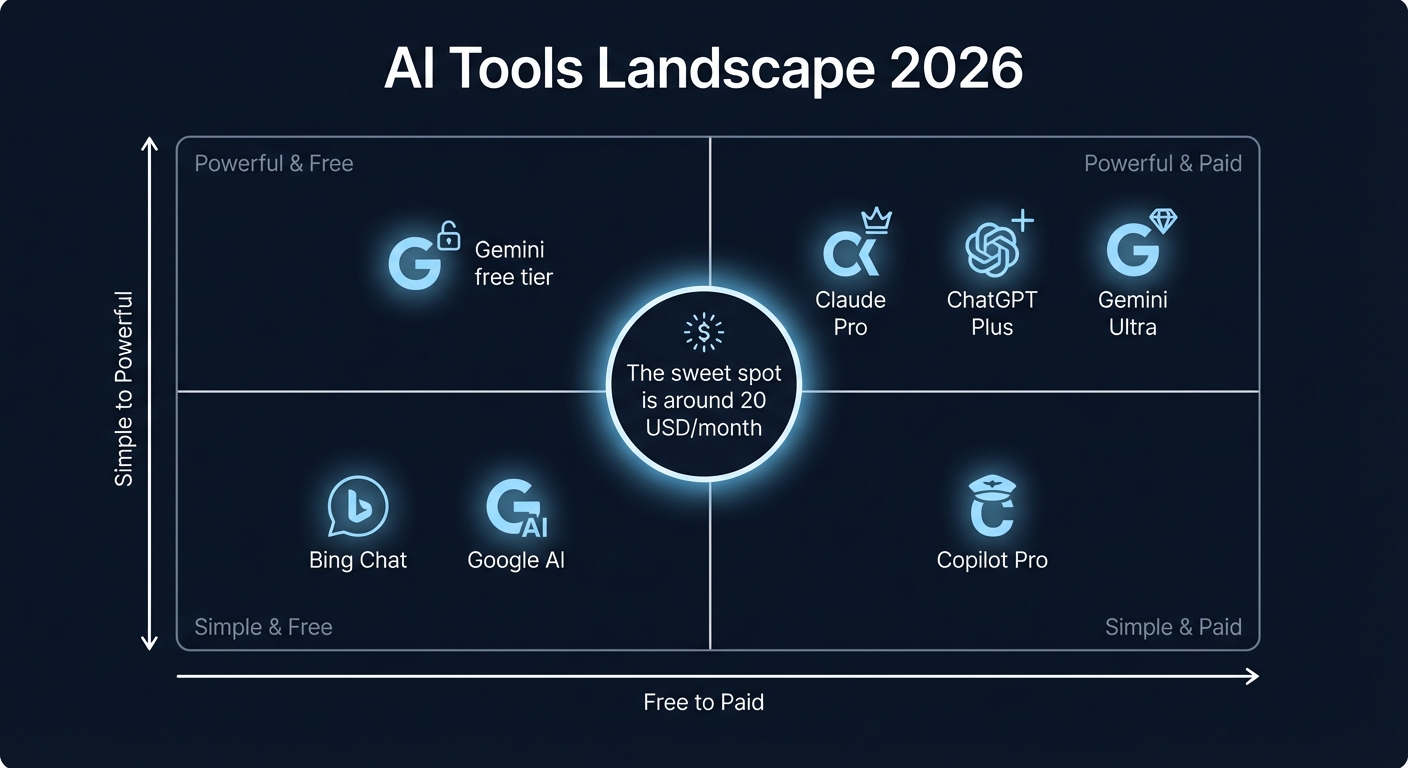
The AI tool market has split into four clear categories. Most people only need tools from one or two of these, but the marketing makes it seem like you need everything. You don't.
Text AI (Claude, ChatGPT, Gemini) handles writing, analysis, research, summarization, and conversation. This is what most people think of when they hear 'AI'. All three are strong, but they have different strengths that matter in practice.
Image AI (Midjourney, DALL-E, Gemini Imagen) generates images from text descriptions. Quality varies wildly between tools and use cases.
Code AI (GitHub Copilot, Claude Code, Cursor) helps developers write, review, and debug code. If you don't write code, you can skip this category entirely.
Video AI (Sora, Veo, Runway) is the newest category. Still limited, expensive, and not production-ready for most use cases. Mentioned here for completeness, but not covered in depth yet.
These three cover 95% of what most people need from AI. They can all write emails, summarize documents, answer questions, and help with analysis. The differences show up in specific use cases and how they handle nuance.
| Claude (Anthropic) | ChatGPT (OpenAI) | Gemini (Google) | |
|---|---|---|---|
| Best at | Long document analysis, nuanced writing, careful reasoning, coding | Broad general knowledge, image generation, web browsing, plugins ecosystem | Google Workspace integration, real-time web access, multimodal input, long context |
| Weakest at | No native image generation, no real-time web search in free tier | Can be verbose, sometimes confidently wrong, writing style can feel generic | Responses can be surface-level, weaker at complex reasoning, inconsistent quality |
| Top model | Opus 4.8 (1M context) | GPT-5.4 Thinking | Gemini 3.1 Pro |
| Context window | Up to 1M tokens (Opus) | 128K tokens | Up to 1M tokens |
| Web access | Yes (Pro plan) | Yes (all plans) | Yes, native Google Search |
| Image generation | No | Yes (DALL-E / GPT Image) | Yes (Imagen) |
Claude is the strongest writer and reasoner of the three. If you work with long documents, need careful analysis, or write a lot, Claude delivers consistently better output. The 1M token context window means you can feed it entire codebases or book-length documents.
ChatGPT has the broadest feature set. Image generation built in, a massive plugin ecosystem, and the largest user base which means more community resources and guides. It is the Swiss army knife: good at many things, best-in-class at few.
Gemini is the obvious choice if you live in Google's ecosystem. Gmail, Docs, Sheets, Drive integration is seamless. The AI just works where you already work. For standalone use outside Google apps, it is the weakest of the three at complex reasoning.
Every tool has a free tier, but the free tiers are deliberately limited to make you upgrade. Here is what the paid plans actually cost and what you get. Prices in USD per month.
| Plan | Claude | ChatGPT | Gemini |
|---|---|---|---|
| Free | Sonnet 4.5, limited usage | GPT-5.3, limited features | Gemini 3 (basic), Google integration |
| Standard paid | Pro: $20/mo -- full model access, Claude Code | Plus: $20/mo -- GPT-5.3+, DALL-E, web browsing | AI Pro: $19.99/mo -- Gemini 3 Pro, 2TB storage, Workspace AI |
| Power user | Max: $100-200/mo | Pro: $200/mo | AI Ultra: $249.99/mo |
| Team / Business | Team: $25/seat/mo | Business: $25-30/user/mo | Google Workspace with AI (varies) |
The sweet spot for most individuals is the $20/month tier from any of these three. That is the point where the tools become genuinely useful for daily work. Below that, usage limits will frustrate you within a week.
The $200/month tiers are for professionals who use AI 4-8 hours per day. If you are not hitting rate limits on the $20 plan, you do not need it. Do not let FOMO drive that purchase.
Image generation has matured fast, but the tools are still very different in what they produce. Midjourney dominates in artistic quality. DALL-E wins on convenience (built into ChatGPT). Gemini Imagen is catching up but trails behind in consistency.
| Midjourney | DALL-E (ChatGPT) | Gemini Imagen | |
|---|---|---|---|
| Quality | Best overall. Stunning for artistic, photorealistic, and stylized images | Good. Best at following specific instructions. Text rendering improved | Decent. Improving rapidly. Good for quick drafts |
| Access | Standalone web app + Discord | Built into ChatGPT (Plus and above) | Built into Gemini (AI Pro and above) |
| Price | Separate: $10-120/mo | Included in Plus: $20/mo | Included in AI Pro: $19.99/mo |
| Commercial use | Yes (all paid plans) | Yes (with usage rights in ToS) | Yes (paid plans) |
| Best for | Marketing visuals, social media, brand imagery, concept art | Quick iterations in conversation, text-heavy images, product mockups | Quick drafts, Google Slides integration |
If image quality is your priority and you generate images regularly, Midjourney is worth the separate subscription. The Standard plan at $30/month with unlimited relaxed generation covers most needs. If you only need occasional images and already have ChatGPT Plus, DALL-E is good enough for 80% of use cases.
Code assistants have gone from autocomplete toys to genuine productivity tools. If you write code professionally, one of these will save you hours per week. Which one depends on how you work.
| GitHub Copilot | Claude Code | Cursor | |
|---|---|---|---|
| Type | VS Code / IDE extension | CLI agent (terminal-based) | Full IDE (VS Code fork) |
| Best at | Inline completions, broad language support, GitHub integration | Complex multi-file changes, codebase understanding, autonomous coding tasks | AI-native editing, codebase-aware chat, inline generation, agent mode |
| Price (individual) | Free / Pro $10/mo / Pro+ $39/mo | Included in Pro $20/mo | Free / Pro $20/mo |
| Workflow | Tab-to-accept while typing. Stays out of the way | Describe a task, it executes across your project. Review and approve | Full editor with AI built into every interaction. Chat + inline + agent |
Copilot is the safe, established choice. It works in your existing editor with minimal setup. Claude Code is the most powerful for complex, multi-file tasks but requires comfort with the terminal. Cursor tries to be both and does a reasonable job, though you are locked into their editor.
Many developers use Copilot for inline completions and Claude Code for larger tasks. They complement each other well.
Stop overthinking this. Pick based on your primary use case. You can always switch or add a second tool later.
Best writing quality, strongest reasoning, largest context window for documents. If you write reports, analyze contracts, or draft long-form content, Claude is the clear winner.
Text, images, web browsing, plugins, voice. If you want one subscription that covers the widest range of tasks and do not need the absolute best in any single category.
If you run your business on Gmail, Docs, and Sheets, Gemini is the path of least friction. The AI assistance appears right where you work. Plus 2TB of cloud storage sweetens the deal.
For professional-quality images at scale. Marketing teams, content creators, and designers get the most value here. The Standard plan's unlimited relaxed mode is the key feature.
Copilot for fast inline completions, Claude Code for complex multi-file changes. This combination covers both quick coding and architectural work. Cursor is a strong alternative if you prefer a single tool.
All three text AIs have usable free tiers. Combine Claude Free for writing, ChatGPT Free for quick questions, and Copilot Free for code. You will hit limits, but it is enough to evaluate before paying.
Here is what different user profiles typically spend on AI tools per month. These numbers come from actual usage patterns, not marketing upsells.
| Profile | Typical tools | Monthly cost |
|---|---|---|
| Casual user | ChatGPT Free or Gemini Free | $0 |
| Knowledge worker | Claude Pro or ChatGPT Plus | $20 |
| Content creator | Claude Pro + Midjourney Standard | $50 |
| Developer | Claude Pro + Copilot Pro | $30 |
| Power user (all categories) | Claude Max + Midjourney Pro + Copilot Pro+ | $199 |
The $20-50/month range covers the sweet spot for most professionals. Going above $100/month only makes sense if AI is central to your daily workflow and you are consistently hitting usage limits.
One more thing: do not subscribe to multiple text AI tools simultaneously unless you have a specific reason. Pick one, use it for a month, and switch if it does not fit. All of them offer monthly billing with no lock-in.